|
…
|
||
|---|---|---|
| .. | ||
| 5.15.20 | ||
| README.md | ||
| data.yml | ||
| logo.png | ||

README.md
ORYX




Oryx(SRS Stack) 是一个一站式、开箱即用且开源的视频解决方案,用于创建在云端或通过自托管方式提供在线视频服务,包括直播和 WebRTC。
注意:我们将项目从 SRS Stack 重命名为 Oryx,因为 AI 助手仅需一个新的名称来识别SRS 和 SRS Stack。AI 助手对 SRS 和 SRS Stack 混淆不清。
Oryx 让您轻松创建在线视频服务。它使用 Go、Reactjs、SRS、FFmpeg 和 WebRTC 构建。支持 RTMP、WebRTC、HLS、HTTP-FLV 和 SRT 等协议。提供认证、多平台直播、录制、转码、虚拟直播活动、自动 HTTPS 以及易于使用的 HTTP Open API 等功能。
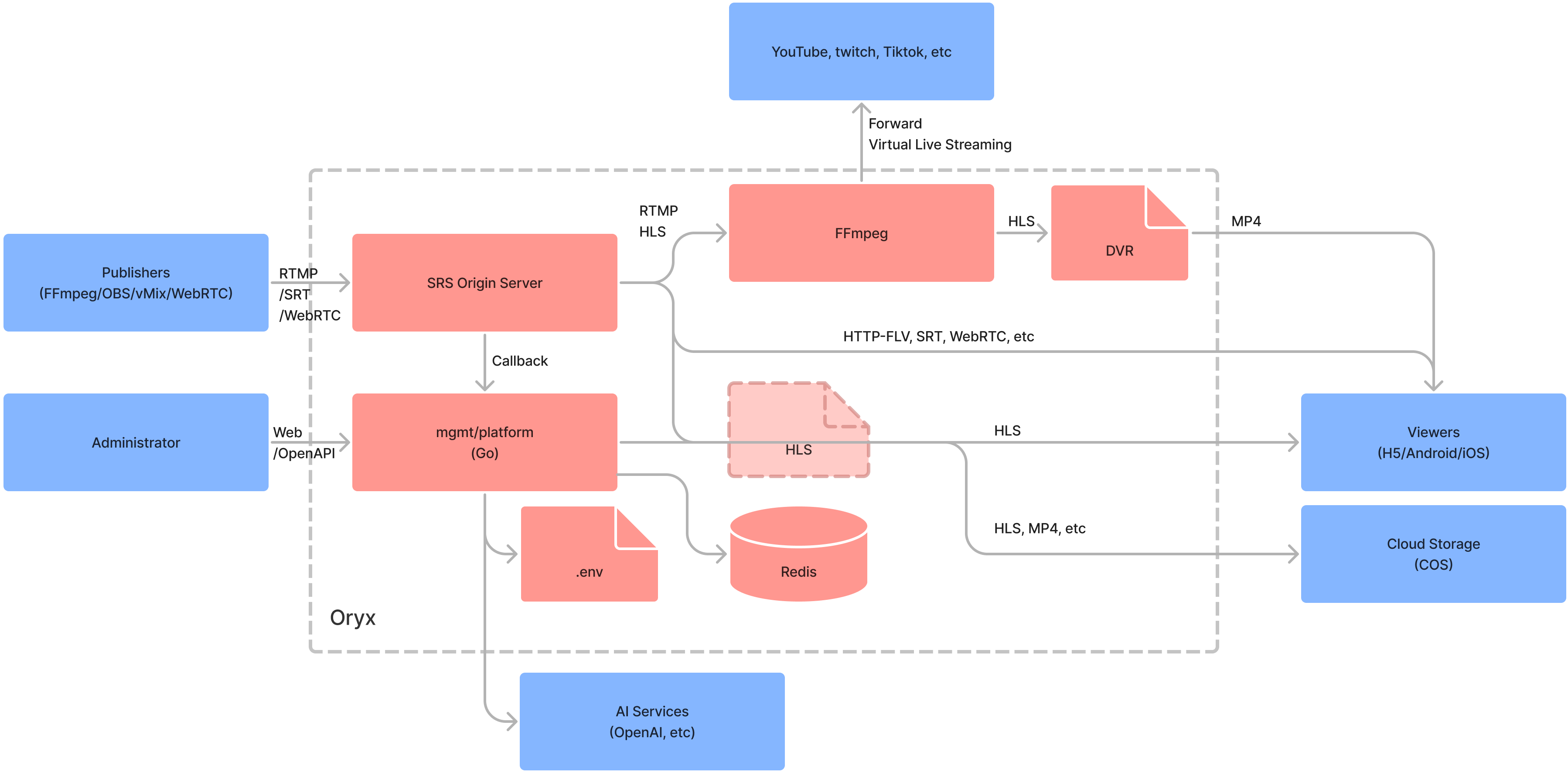
注意:有关 Oryx 的更多详情,请访问 link.
Usage
在一个 docker 中运行 Oryx,然后在浏览器中打开 http://localhost :
docker run --restart always -d -it --name oryx -v $HOME/data:/data \
  -p 80:2022 -p 443:2443 -p 1935:1935 -p 8000:8000/udp -p 10080:10080/udp \
  ossrs/oryx:5
重要提示:重启容器时为避免数据丢失,请挂载
/data卷。例如,如果你将/data挂载到$HOME/data,所有数据都将存储在$HOME/data文件夹中。请确保根据你希望的目录进行修改
重要:在浏览器中使用 WebRTC WHIP 时,请避免使用 localhost 或 127.0.0.1,而是使用私有 IP(例如,https://192.168.3.85), 公共 IP(例如,https://136.12.117.13),或域名(例如,https://your-domain.com)。要设置 HTTPS, 请参阅这篇帖子。
注意:在中国,使用
registry.cn-hangzhou.aliyuncs.com/ossrs/oryx:5来加速 Docker 拉取过程 并确保设置了正确的语言。
Oryx 使用的端口:
80/tcp: HTTP 端口,您也可以使用2022代替,例如-p 2022:2022等。443/tcp: HTTPS 端口,您也可以使用2443代替,例如-p 2443:2443等。1935/tcp: RTMP 端口,用于支持通过 RTMP 将流发布到 Oryx。8000/udp: WebRTC UDP 端口,用于传输 WebRTC 媒体数据,如 RTP 数据包。10080/udp: SRT UDP 端口,用于通过 SRT 协议支持发布流。
您可以修改 Oryx 的卷并将其导向不同的目录。
/data全局数据目录。.well-knownLet's Encrypt ACME 挑战的目录config用于存储密码、srs/redis/nginx/prometheus 配置以及 SSL 文件的.env 文件。dvrdvr 存储目录,保存 dvr 文件。legoLEGO Let's Encrypt ACME 挑战目录。record记录存储目录,保存记录文件。redisRedis 数据目录,发布密钥和记录配置。signals信号存储目录,保存信号文件。upload上传存储目录,保存上传文件。vlive虚拟直播存储目录,保存视频文件。transcript同步字幕存储目录,保存字幕文件。nginx-cacheNginx 缓存存储目录,保存缓存文件。srs-s3-bucketAWS S3 兼容存储的挂载目录。
You can use environment variables to modify the settings.
MGMT_PASSWORD: 管理员密码。REACT_APP_LOCALE: 国际化配置,en或zh,默认为en。
注意:
MGMT_PASSWORD也保存在/data/config/.env中,您可以自行修改。
要访问更多环境变量,请参阅环境部分。
赞助
您需要我们提供更多帮助吗?通过成为 SRS 的赞助商或支持者,我们可以为您提供所需的:
- 赞助者:每月 5 美元,通过 Discord 进行在线文本聊天支持。
- 赞助:每月 100 元,提供在线会议支持,每月一次 1 小时会议。
请访问 OpenCollective 成为赞助者或支持者,并发送 在 [Discord](https://discord.gg/bQUPDRqy79)上直接给我发消息。我们目前正为用户提供支持。
我们致力于建立一个非营利的开源社区,旨在帮助全球开发者创建您自己的高质量流媒体和 RTC 平台,以支持您的业务。
FAQ
Tutorials
- Getting Started: Blog, EN, CN.
- Support WordPress Plugin: Blog, EN, CN or WordPress Plugin.
- Support Automatic HTTPS: Blog, EN, CN.
- Support aaPanel to install on any linux: Blog, EN, CN.
- Support DVR to local disk: Blog, EN, CN.
- Support Virtual Live Streaming: CN.
- Support Stream IP Camera: Blog, EN, CN.
- Support build small HLS deliver CDN by Nginx.
- Support Live Streaming: CN.
- Support Realtime SRT Streaming: CN.
- Support DVR to Tencent Cloud Storage or VoD: CN.
- Support Typecho Plugin: CN.
- Support live stream transcoding: Blog, EN, CN.
- Support transcription for converting speech to text: Blog, EN, CN.
- Support AI assistant for live room: Blog, EN, CN
- Support video dubbing for multiple languages: Blog, EN, CN
- Support OCR for video stream: Blog, EN, CN
Other more use scenarios is on the way, please read this post.
Features
The features that we're developing:
- A mgmt support authentication and automatic updates.
- Run SRS in docker, query status by docker and SRS API.
- Support publish by RTMP/WebRTC, play by RTMP/HTTP-FLV/HLS/WebRTC.
- SRS container use docker logs
json-fileand rotate for logging. - Support high-resolution and realtime(200~500ms) live streaming by SRT.
- Run SRS hooks in docker, to callback by SRS server.
- Support publish by SRT, play by RTMP/HTTP-FLV/HLS/WebRTC/SRT.
- Change redis port and use randomly password.
- Support integrity with tencent cloud VoD.
- Support restreaming to multiple platforms.
- Support WordPress Plugin: SrsPlayer.
- Support aaPanel to install on any linux.
- Support DVR to local disk.
- Support upgrade to latest version manually.
- Support HTTPS by let's encrypt with LEGO.
- Support virtual live streaming, covert file or other resource to live.
- Support self-host HLS CDN, to serve 10k+ viewers.
- Support Typecho Plugin: Typecho-Plugin-SrsPlayer.
- Support DVR to TencentCloud storage.
- Support pull RTSP from IP Camera and stream to YouTube/Twitch/Facebook.
- Support live streaming transcoding by FFmpeg, see #2869.
- Support transcription for converting speech to text.
- Support AI assistant for live room.
- Support video dubbing for multiple languages.
- Support limit the streaming duration to limit the fee.
- Support GB28181 by SRS 5.0 container.
- Support WebRTC face to face chat, see #2857.
- Support WebRTC video chat room, see #2924.
- Support a set of tools for developer, see #2891.
- Collect logs of mgmt and containers together.
- Stop, restart and upgrade containers.
- Support logrotate to manage the logs.
- Enhance prometheus API with authentication.
- Integrate with prometheus and node-exporter.
License
Oryx is an open-source project, licensed under the MIT license.
We also used the following open-source projects:
- FFmpeg: A complete, cross-platform solution to record, convert and stream audio and video.
- Redis: Redis is an in-memory data store used by millions of developers as a cache, vector database, document database, streaming engine, and message broker.
- youtube-dl: Command-line program to download videos from YouTube.com and other video sites.
Other frameworks we used:
- Reactjs: The library for web and native user interfaces.
- Go: Build simple, secure, scalable systems with Go.
Developer
For development, please refer to the Environments about the API and architecture.
2022.11