261 lines
13 KiB
Markdown
261 lines
13 KiB
Markdown
# [](https://bytebase.com?source=github)
|
||
|
||
🔥 在线演示 • ⚙️ 安装 • 📚 文档 • [**💬 Discord**](https://discord.gg/huyw7gRsyA) • [**🙋♀️ Book Demo**](https://www.bytebase.com/request-demo/)
|
||
|
||
[](https://goreportcard.com/report/github.com/bytebase/bytebase)[ ](https://artifacthub.io/packages/search?repo=bytebase)[](https://github.com/bytebase/bytebase)
|
||
|
||
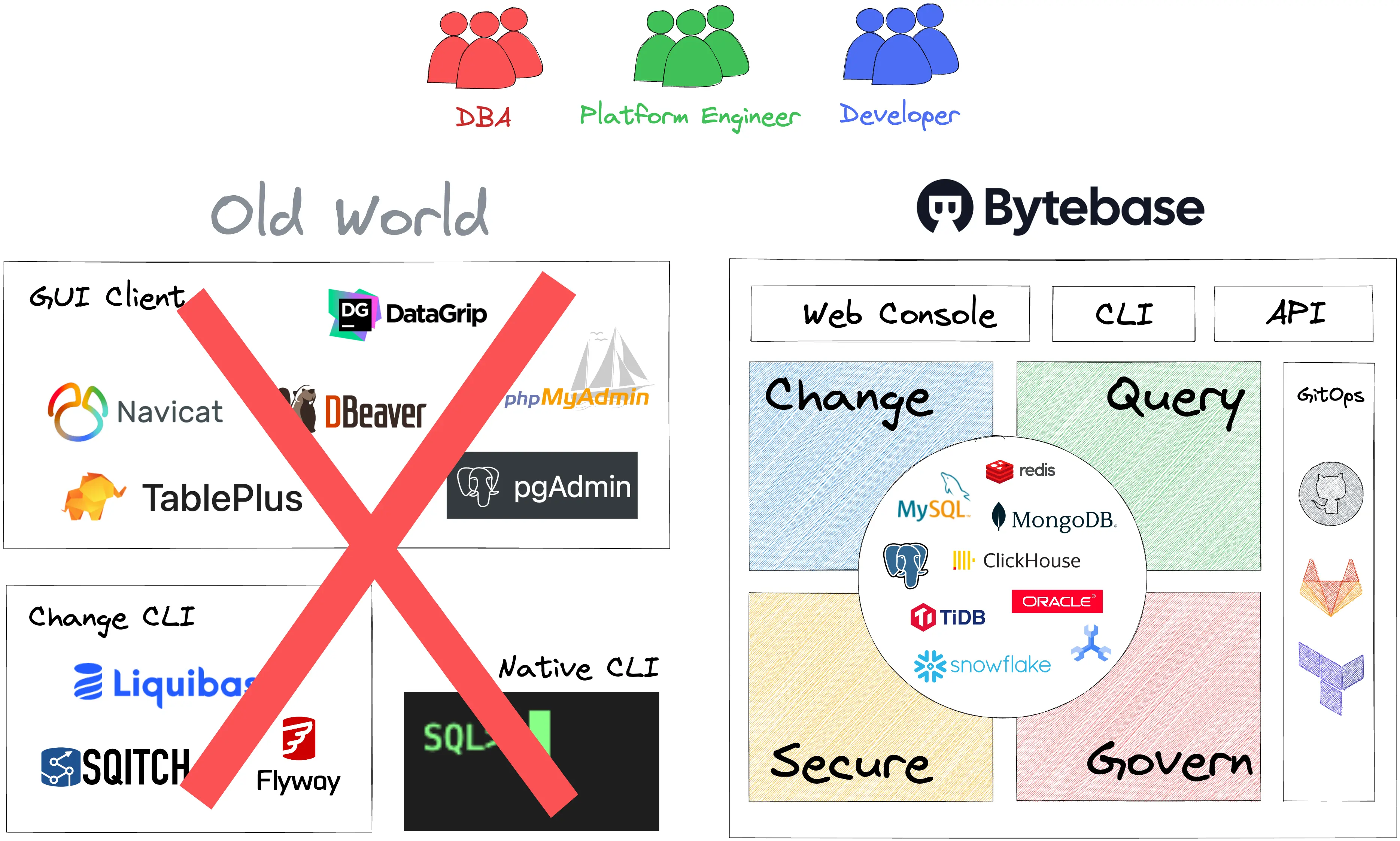
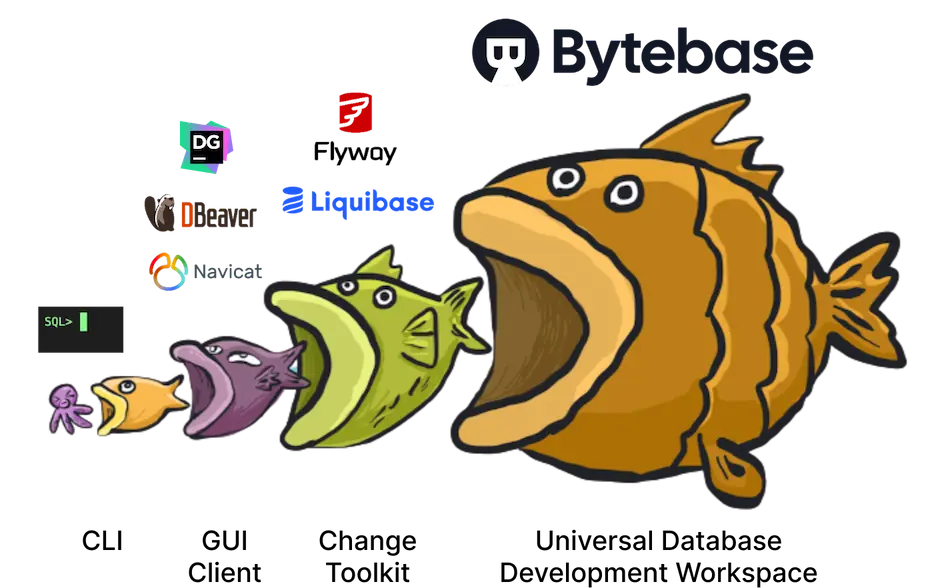
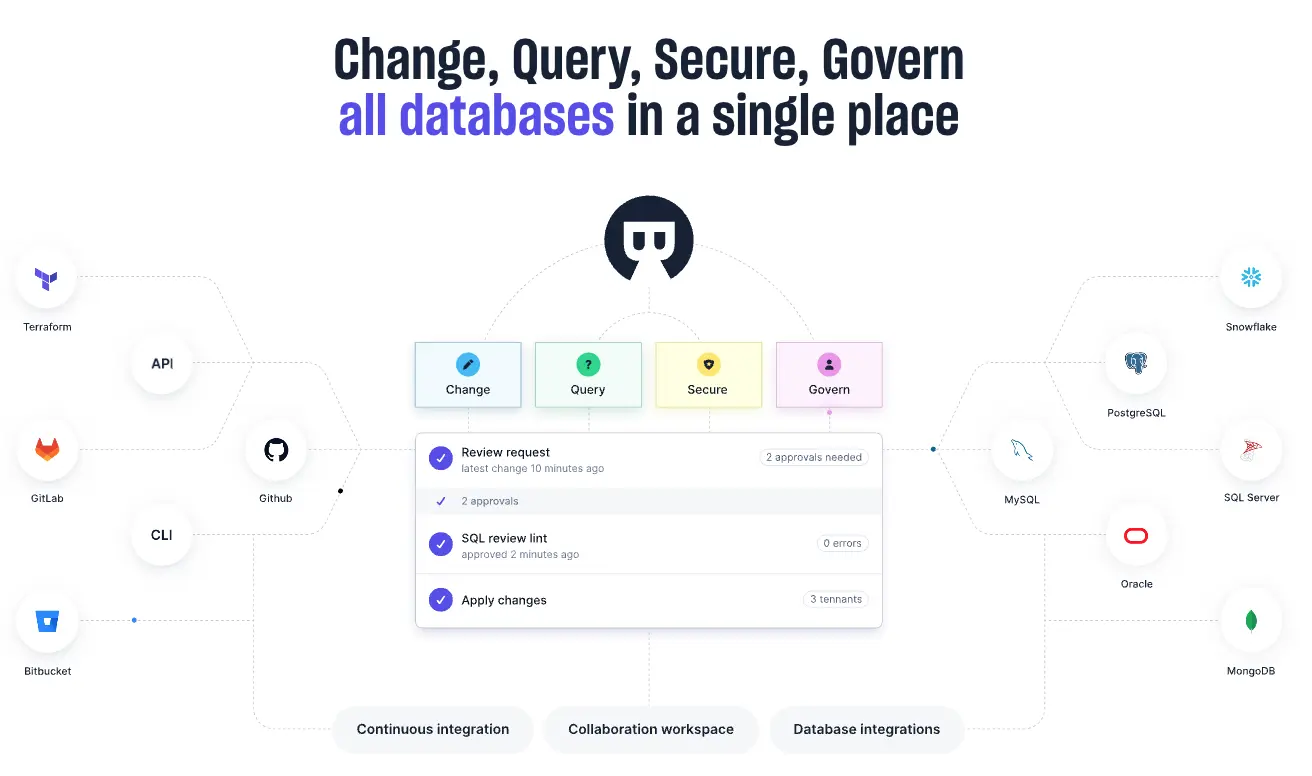
**不同的**数据库开发任务
|
||
|
||
**多个**数据库系统
|
||
|
||
统一过程
|
||
|
||
单一工具
|
||
|
||
|
||
|
||
|
||
|
||
|
||
|
||
🪜
|
||
|
||
# 更改
|
||
|
||
想要正式化数据库变更流程,但不知道如何操作?
|
||
|
||
| | |
|
||
| --- | --- |
|
||
| **标准操作程序(SOP)**<br />标准化不同数据库系统、小型或大型表以及不同租户之间的数据库架构和数据变更流程。<br />**SQL 审查**<br />[100+条代码规范](https://www.bytebase.com/docs/sql-review/review-rules)用于检测 SQL 反模式并在组织中强制执行一致的 SQL 风格。<br />**GitOps**<br />[一键式 GitHub 和 GitLab 集成 ](https://www.bytebase.com/docs/vcs-integration/overview),以实现数据库变更的 GitOps 工作流。 | <img src="https://raw.githubusercontent.com/bytebase/bytebase/main/docs/assets/issue-detail.webp" /> |
|
||
|
||
🔮
|
||
|
||
# 查询
|
||
|
||
想控制数据访问却不知如何操作?
|
||
|
||
| | |
|
||
| --- | --- |
|
||
| **一站式 SQL 编辑器** <br/>专门用于执行 SQL 特定任务的基于 Web 的 IDE。<br/><br/>**数据脱敏**<br/>最先进的[列级掩码](https://www.bytebase.com/docs/sql-editor/mask-data)引擎,可覆盖子查询、CTE 等复杂情况。<br/><br/>**数据访问控制**<br/>组织层面政策以集中[数据访问控制 ](https://www.bytebase.com/docs/security/data-access-control)。 | <img src="https://raw.githubusercontent.com/bytebase/bytebase/main/docs/assets/sql-editor.webp" /> |
|
||
|
||
🔒
|
||
|
||
# 安全
|
||
|
||
想要避免数据泄露、服务中断并检测恶意行为却不知如何操作?
|
||
|
||
| | |
|
||
| --- | --- |
|
||
| **集中变更、查询和管理任务** <br/>在一个地方执行不同数据库上的不同任务,从而执行策略并相应地监控活动。<br/><br/>**基于角色的访问控制(RBAC)**<br/>[两级基于角色的访问控制模型](https://www.bytebase.com/docs/concepts/roles-and-permissions)分别映射到组织范围内的权限和应用团队权限。<br/>**异常中心和审计日志**<br/><br/>捕获所有数据库 [异常 ](https://www.bytebase.com/docs/administration/anomaly-center)、用户操作和系统事件,并以整体视图呈现。 | <img src="https://raw.githubusercontent.com/bytebase/bytebase/main/docs/assets/grant-access.webp" /> |
|
||
|
||
👩💼
|
||
|
||
# 治理
|
||
|
||
想强制执行组织策略但不知道怎么做?
|
||
|
||
| | |
|
||
| --- | --- |
|
||
| **管理数据库资源**<br/>一个地方管理环境、数据库实例、数据库用户以进行应用开发,可选的 [Terraform 集成 ](https://registry.terraform.io/providers/bytebase/bytebase/latest/docs)。<br/><br/>**策略执行**<br/>强制执行组织范围内的 SQL 审查策略、备份策略和数据访问策略。<br/><br/>**SQL 编辑器管理员模式**<br/>[类似 CLI 的体验 ](https://www.bytebase.com/docs/sql-editor/admin-mode),无需设置堡垒机。 | <img src="https://raw.githubusercontent.com/bytebase/bytebase/main/docs/assets/sql-review-policy.webp" /> |
|
||
|
||
# 🪄 引言
|
||
|
||
Bytebase 是一个面向开发人员和数据库管理员的数据库持续集成/持续部署解决方案。它是 **唯一被 CNCF 景观收录的数据库 CI/CD 项目** 。Bytebase 家族包括以下这些工具:
|
||
|
||
* [Bytebase 控制台](https://bytebase.com/?source=github) : 一个基于 Web 的图形界面,供开发人员和数据库管理员管理数据库开发生命周期。
|
||
* [Bytebase CLI (bb)](https://www.bytebase.com/docs/cli/overview): 一个命令行工具,帮助开发人员将数据库变更集成到现有的持续集成/持续部署流程中。
|
||
* [Bytebase GitHub App](https://github.com/marketplace/bytebase) 和 [SQL Review GitHub Action](https://github.com/marketplace/actions/sql-review): 一个 GitHub 应用程序和 GitHub 动作,用于在 Pull Request 中检测 SQL 反模式并强制执行一致的 SQL 代码规范。
|
||
* [Terraform Bytebase 提供程序](https://registry.terraform.io/providers/bytebase/bytebase/latest/docs) : Terraform 提供程序使团队能够通过 Terraform 管理 Bytebase 资源。典型的设置是团队使用 Terraform 从云供应商处部署数据库实例,然后使用 Bytebase 提供程序将这些实例准备就绪以供应用程序使用。
|
||
|
||
| | 主题 |
|
||
| --- | --- |
|
||
| 🏗️ | 安装 |
|
||
| 🎮 | 演示 |
|
||
| 👩🏫 | 教程 |
|
||
| 💎 | 设计原则 |
|
||
| 🧩 | 数据模型 |
|
||
| 🎭 | 角色 |
|
||
| 🕊 | 开发与贡献 |
|
||
| 🤺 | Bytebase vs 替代方案 |
|
||
|
||
# 🏗️ 安装
|
||
|
||
### 一句话概括
|
||
|
||
```bash
|
||
# One-liner installation script from latest release
|
||
/bin/bash -c "$(curl -fsSL https://raw.githubusercontent.com/bytebase/install/main/install.sh)"
|
||
|
||
```
|
||
|
||
* [从源代码构建](https://www.bytebase.com/docs/get-started/install/build-from-source-code)
|
||
* [Docker](https://www.bytebase.com/docs/get-started/install/deploy-with-docker)
|
||
* [Kubernetes](https://www.bytebase.com/docs/get-started/install/deploy-to-kubernetes)
|
||
* [render.com](https://www.bytebase.com/docs/get-started/install/deploy-to-render)
|
||
* [Rainbond](https://www.bytebase.com/docs/get-started/install/deploy-to-rainbond)
|
||
|
||
# 🎮 示例
|
||
|
||
Live demo at [https://demo.bytebase.com](https://demo.bytebase.com)
|
||
|
||
您还可以与我们的产品专家预约一个 30 分钟的产品导览。 [预约链接](https://cal.com/adela-bytebase/30min)
|
||
|
||
# 👩🏫 教程
|
||
|
||
产品教程可在 [https://www.bytebase.com/tutorial](https://www.bytebase.com/tutorial) 获取。
|
||
|
||
## 集成
|
||
|
||
* [管理 Supabase PostgreSQL](https://www.bytebase.com/docs/how-to/integrations/supabase)
|
||
* [管理渲染 PostgreSQL](https://www.bytebase.com/docs/how-to/integrations/render)
|
||
* [管理 Neon 数据库](https://www.bytebase.com/docs/how-to/integrations/neon)
|
||
* [部署到 sealos](https://www.bytebase.com/docs/get-started/install/deploy-to-sealos)
|
||
* [部署到 Rainbond](https://www.bytebase.com/docs/get-started/install/deploy-to-rainbond)
|
||
|
||
# 💎 设计原则
|
||
|
||
| | | |
|
||
| --- | --- | --- |
|
||
| 🪶 | 无依赖 | 只需一条命令 ./bytebase 即可开始,无需任何外部依赖。外部的 PostgreSQL 数据存储和其他项均为可选。 |
|
||
| 🔗 | 优先集成 | 专注于数据库管理,其余部分留给其他工具。我们原生集成了 GitHub/GitLab、Terraform 提供程序 、webhook 等版本控制系统集成。 |
|
||
| 👩🦳 | 工程严谨 | 严谨的双周发布和工程实践。 |
|
||
|
||
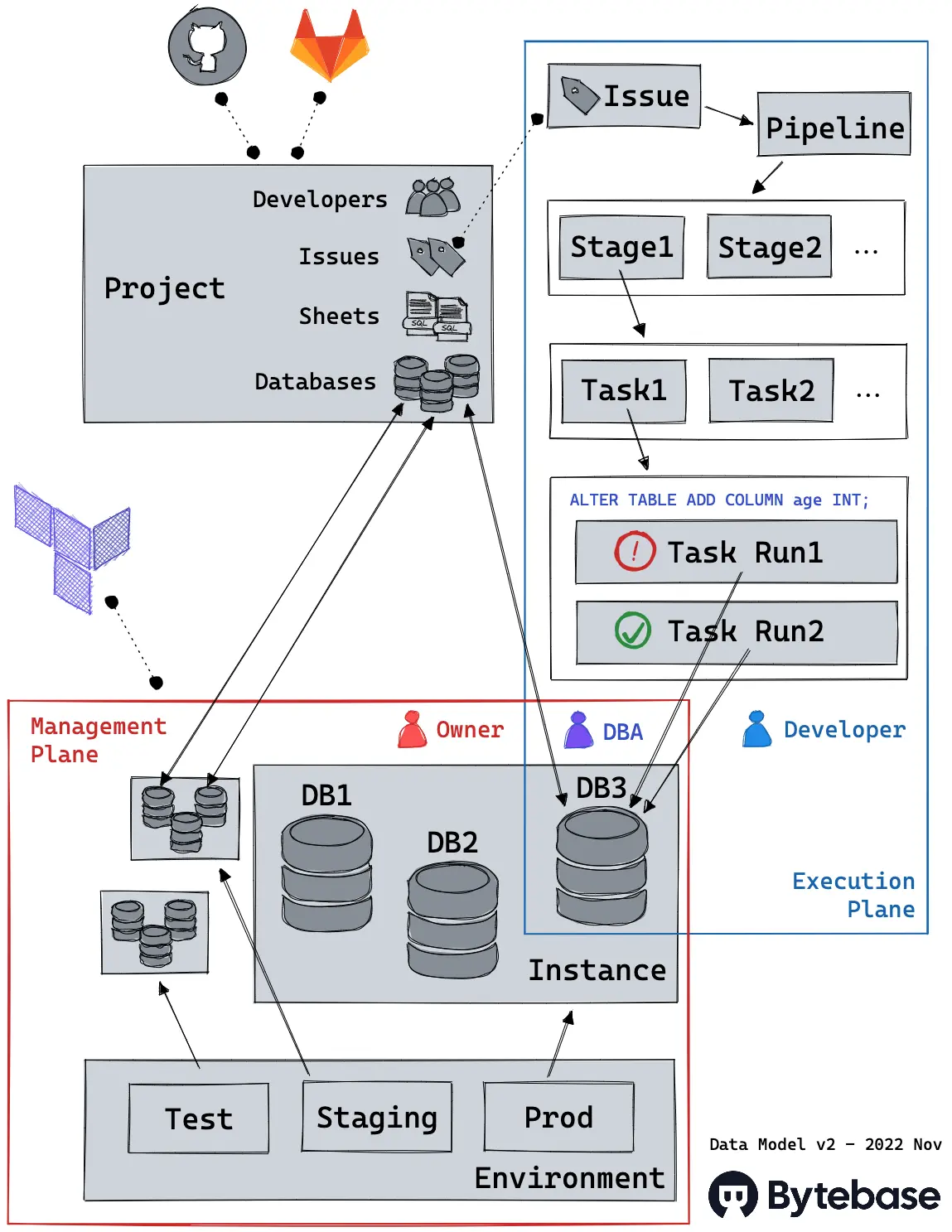
# 🧩 数据模型
|
||
|
||
更多详情参见 [数据模型文档](https://www.bytebase.com/docs/concepts/data-model) 。
|
||
|
||
|
||
|
||
# 🎭 角色
|
||
|
||
更多详情请参阅[角色和权限文档](https://www.bytebase.com/docs/concepts/roles-and-permissions) 。
|
||
|
||
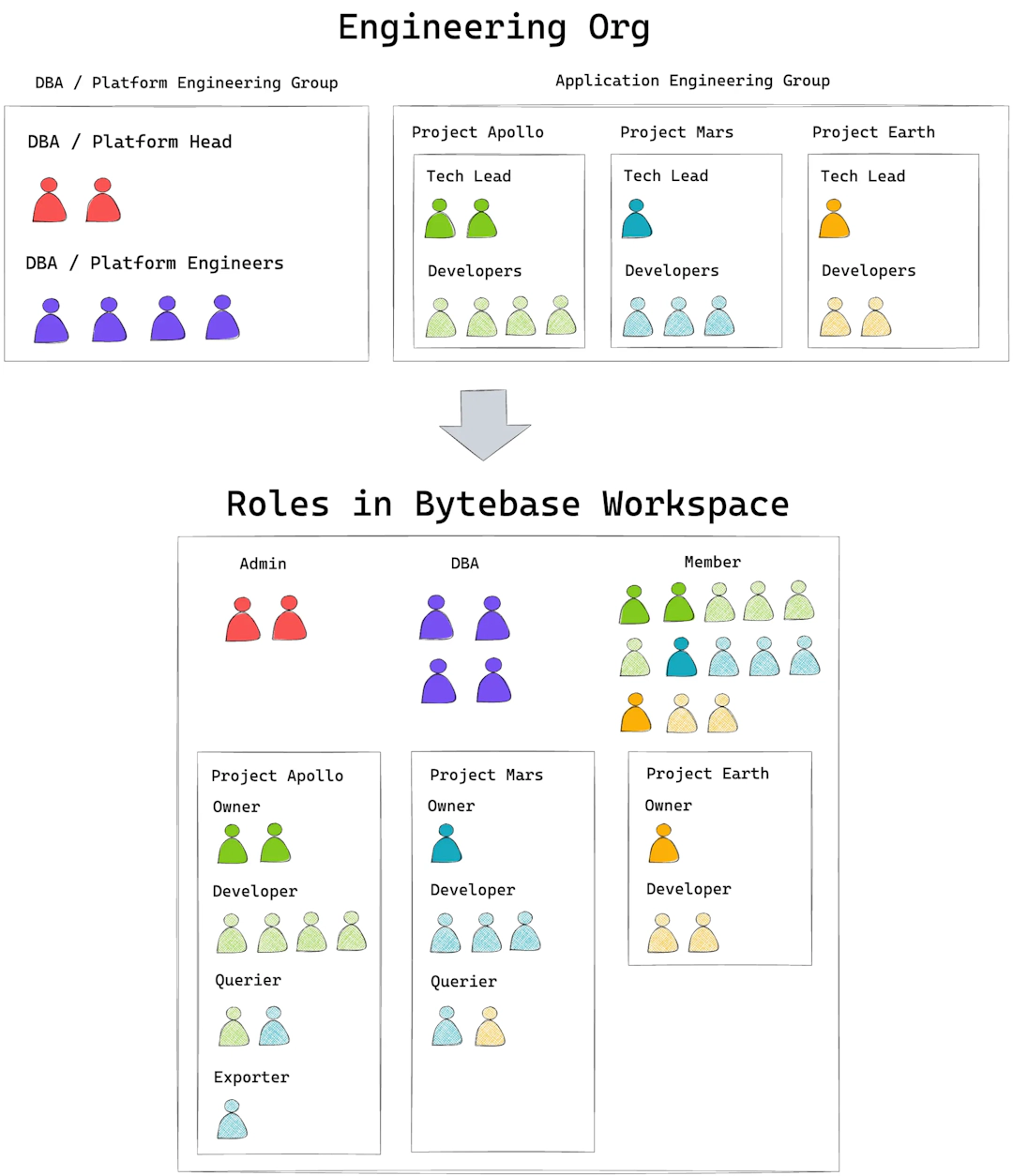
Bytebase 使用基于角色的访问控制(RBAC),并在工作空间和项目级别提供了两种角色集:
|
||
|
||
* 工作空间角色:`Owner`、`DBA`、`Developer`。工作空间角色映射到工程组织中的角色。
|
||
* 项目角色:`Owner`、`Developer`。项目级别角色映射到特定团队或项目的角色。
|
||
|
||
每个用户都会被分配一个工作空间角色,如果某个用户参与了某个特定项目,那么她也会相应地被分配一个项目角色。
|
||
|
||
下图描述了典型的技术团队与 Bytebase 工作空间中相应角色之间的映射关系。
|
||
|
||
|
||
|
||
# 🕊 开发与贡献
|
||
|
||
|
||
|
||
* Bytebase 使用了精心挑选的技术栈,它针对开发者的体验进行了优化,并且非常容易开始编写代码:
|
||
|
||
1. 它没有外部依赖。
|
||
2. 无需任何配置。
|
||
3. 启动后端和前端各一个命令,都支持实时重载。
|
||
|
||
* [模式变更的生命周期](https://sourcegraph.com/github.com/bytebase/bytebase/-/blob/docs/design/life-of-a-schema-change.snb.md)
|
||
* [SQL 审查](https://sourcegraph.com/github.com/bytebase/bytebase/-/blob/docs/design/sql-review-source-code-tour.snb.md)
|
||
* 查看 [功能生命周期](https://github.com/bytebase/bytebase/blob/main/docs/life-of-a-feature.md) 。
|
||
|
||
|
||
## 开发环境设置
|
||
|
||
### 先决条件
|
||
|
||
* [Go](https://golang.org/doc/install) (1.21.3 或更高版本)
|
||
* [pnpm](https://pnpm.io/installation)
|
||
* [Air](https://github.com/bytebase/air) ( **我们的分支仓库 @87187cc,包含正确的信号处理** ). 这是为了实现后端实时刷新。
|
||
|
||
```bash
|
||
go install github.com/bytebase/air@87187cc
|
||
```
|
||
|
||
|
||
### 步骤
|
||
|
||
1. 拉取源代码。
|
||
|
||
```bash
|
||
git clone https://github.com/bytebase/bytebase
|
||
```
|
||
|
||
2. 在本地主机上创建外部 Postgres 数据库。
|
||
|
||
|
||
```sql
|
||
CREATE USER bbdev SUPERUSER;
|
||
CREATE DATABASE bbdev;
|
||
```
|
||
|
||
1. 使用 air 启动后端(带有实时重载)。
|
||
|
||
```bash
|
||
PG_URL=postgresql://bbdev@localhost/bbdev air -c scripts/.air.toml
|
||
```
|
||
|
||
如果遇到“错误:打开的文件太多”的问题,请更改打开文件限制。
|
||
|
||
```bash
|
||
ulimit -n 10240
|
||
```
|
||
|
||
如果需要额外的运行时参数(如 --backup-bucket),请像这样添加它们:
|
||
|
||
```bash
|
||
air -c scripts/.air.toml -- --backup-region us-east-1 --backup-bucket s3:\\/\\/example-bucket --backup-credential ~/.aws/credentials
|
||
```
|
||
|
||
2. 启动前端(带有实时重载)。
|
||
|
||
```bash
|
||
cd frontend && pnpm i && pnpm dev
|
||
```
|
||
|
||
Bytebase 现在应该在 [http://localhost:3000](http://localhost:3000) 运行,并且修改前端或后端代码会触发实时重载。
|
||
|
||
|
||
### 提示
|
||
|
||
* 使用 [Code Inspector](https://en.inspector.fe-dev.cn/guide/start.html#method1-recommend) 从界面定位前端代码。在 Mac 上按 `Option + Shift`,在 Windows 上按 `Alt + Shift`。
|
||
|
||
# Bytebase vs Flyway, Liquibase
|
||
|
||
* [Bytebase vs Liquibase](https://www.bytebase.com/blog/bytebase-vs-liquibase/)
|
||
* [Bytebase vs Flyway](https://www.bytebase.com/blog/bytebase-vs-flyway/)
|
||
|
||
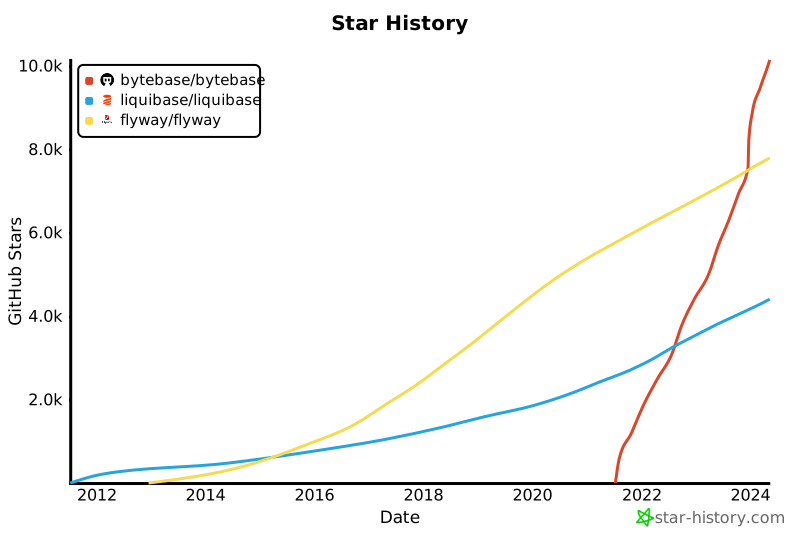
无论是 Liquibase 还是 Flyway 都是专注于数据库模式变更的库和命令行界面(CLI)。而 Bytebase 则是一个一站式解决方案,涵盖了整个数据库开发生命周期,支持开发人员和数据库管理员(DBA)协作。
|
||
|
||
另一个关键区别是,Bytebase **不**支持 Oracle 和 SQL Server。这是我们有意做出的决定,以便我们可以专注于支持其他工具支持不足的数据库。特别是,许多我们的用户告诉我们,Bytebase 无疑是(有时是唯一的选择)支持他们 PostgreSQL 和 ClickHouse 用例的最佳数据库工具。
|
||
|
||
[](https://star-history.com/#bytebase/bytebase&liquibase/liquibase&flyway/flyway&Date)
|
||
|
||
# Bytebase vs Yearning, Archery
|
||
|
||
Either Yearning 或 Archery 提供了 DBA 操作门户。而 Bytebase 为 DBA 和开发者提供了一个协作工作空间,并将 DevOps 实践引入了数据库变更管理(DCM)。Bytebase 具有与 GitLab/GitHub 中的 `Project` 类似的概念,并提供了与 GitLab/GitHub 的原生 GitOps 集成。
|
||
|
||
另一个关键区别在于,Yearning 和 Archery 是由个人业余时间维护的开源项目。而 Bytebase 是开源的,但它采用了开放核心模型,并且是一个商业产品,由一个 全职团队 支持,并且每两周发布一次新版本。
|
||
|
||
[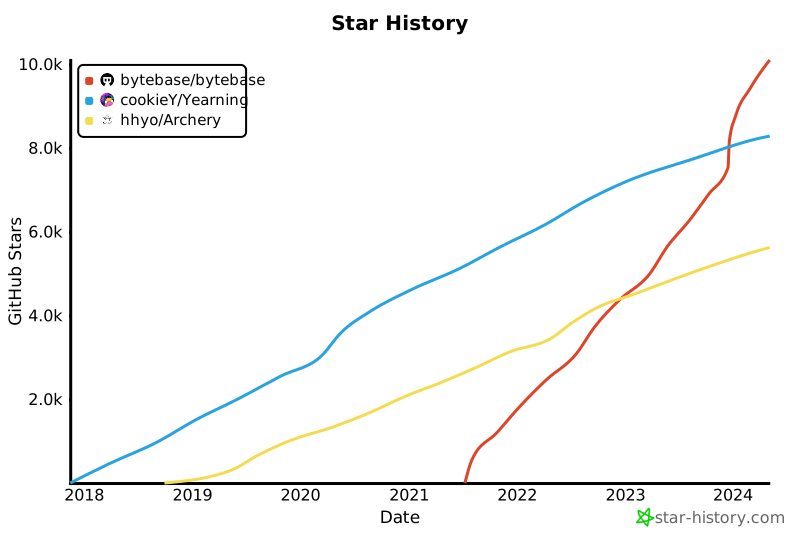](https://star-history.com/#bytebase/bytebase&cookieY/Yearning&hhyo/Archery&Date)
|
||
|
||
# FAMILY Community
|
||
|
||
[](https://discord.gg/huyw7gRsyA)
|
||
|
||
[](https://twitter.com/Bytebase)
|
||
|
||
# 🤔 常见问题解答 (FAQs)
|
||
|
||
请查阅我们的 常见问题 。
|
||
|
||
# 🙋 联系我们
|
||
|
||
* 如果您有兴趣加入我们,请查阅我们的 职位页面 查看是否有适合您的职位。
|
||
* 想要解决你的模式变更和数据库管理难题?预约与我们的产品专家进行一次 [30 分钟的演示](https://cal.com/adela-bytebase/30min) 。Qs)
|
||
|
||
Check out our [FAQ](https://www.bytebase.com/docs/faq).
|
||
|
||
<br />
|
||
|
||
# 🙋 Contact Us
|
||
|
||
- Interested in joining us? Check out our [jobs page](https://bytebase.com/jobs?source=github) for openings.
|
||
- Want to solve your schema change and database management headache? Book a [30min demo](https://cal.com/adela-bytebase/30min) with one of our product experts.
|