163 lines
7.5 KiB
Markdown
163 lines
7.5 KiB
Markdown
[](https://www.npmjs.com/package/dbgate-serve)  [](https://snapcraft.io/dbgate) [](https://snapcraft.io/dbgate) [](https://github.com/prettier/prettier)
|
||
|
||

|
||
|
||
# DbGate - (无)SQL 数据库客户端
|
||
|
||
DbGate 是一款跨平台数据库管理器。它设计得简单易用,同时高效地处理多个数据库。但同时也拥有许多高级功能,如模式比较、可视化查询设计器、图表可视化或批量导入导出。
|
||
|
||
DbGate 采用 MIT 许可证,并且完全免费。
|
||
|
||
* 在线试用 - [demo.dbgate.org](https://demo.dbgate.org) - 在线演示应用程序
|
||
* **下载**适用于 Windows、Linux 或 Mac 的应用程序,从 [dbgate.org](https://dbgate.org/download/)
|
||
* 作为 [NPM 包](https://www.npmjs.com/package/dbgate-serve)或 [docker 镜像](https://hub.docker.com/r/dbgate/dbgate)运行 Web 版本
|
||
|
||
## 支持的数据库
|
||
|
||
* MySQL
|
||
* PostgreSQL
|
||
* SQL Server
|
||
* Oracle (实验性)
|
||
* MongoDB
|
||
* Redis
|
||
* SQLite
|
||
* Amazon Redshift
|
||
* CockroachDB
|
||
* MariaDB
|
||
|
||
[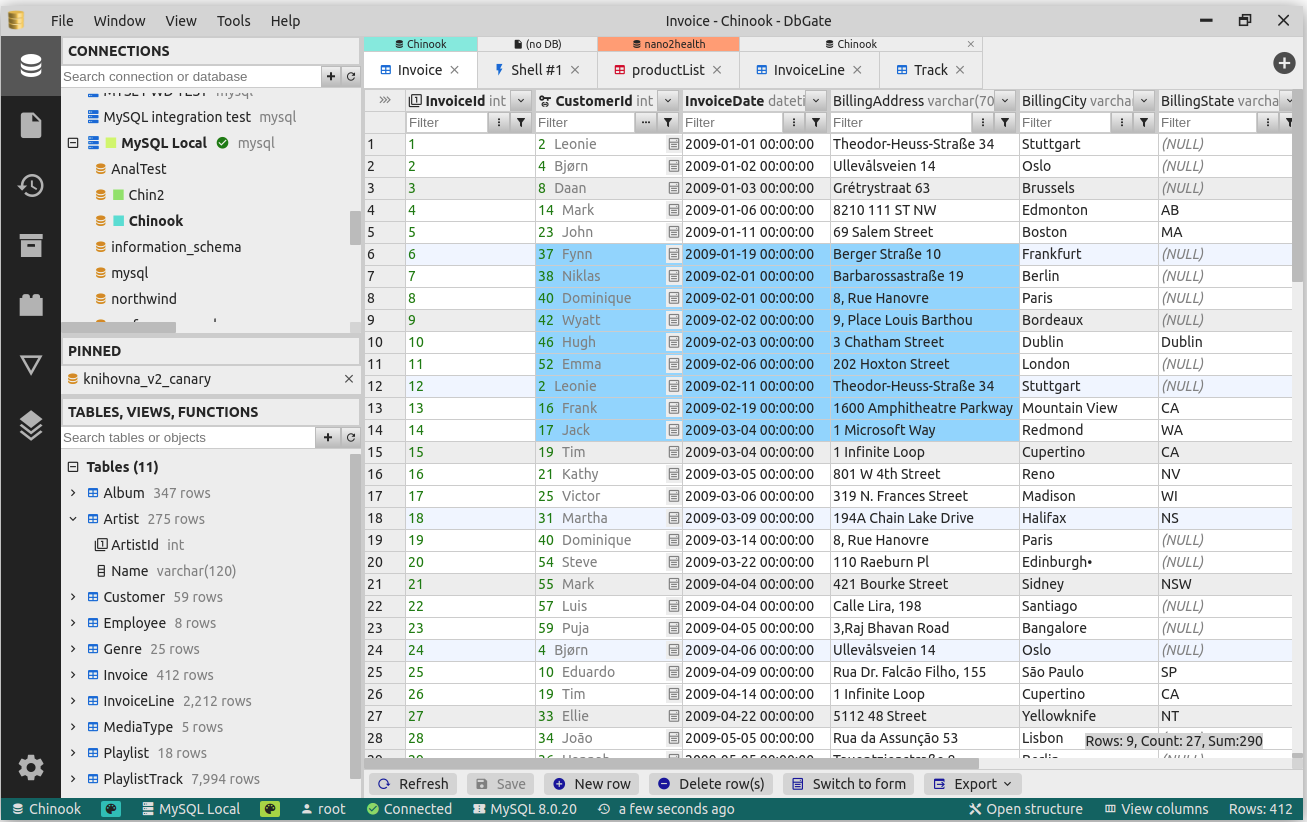](https://raw.githubusercontent.com/dbgate/dbgate/master/img/screenshot1.png)[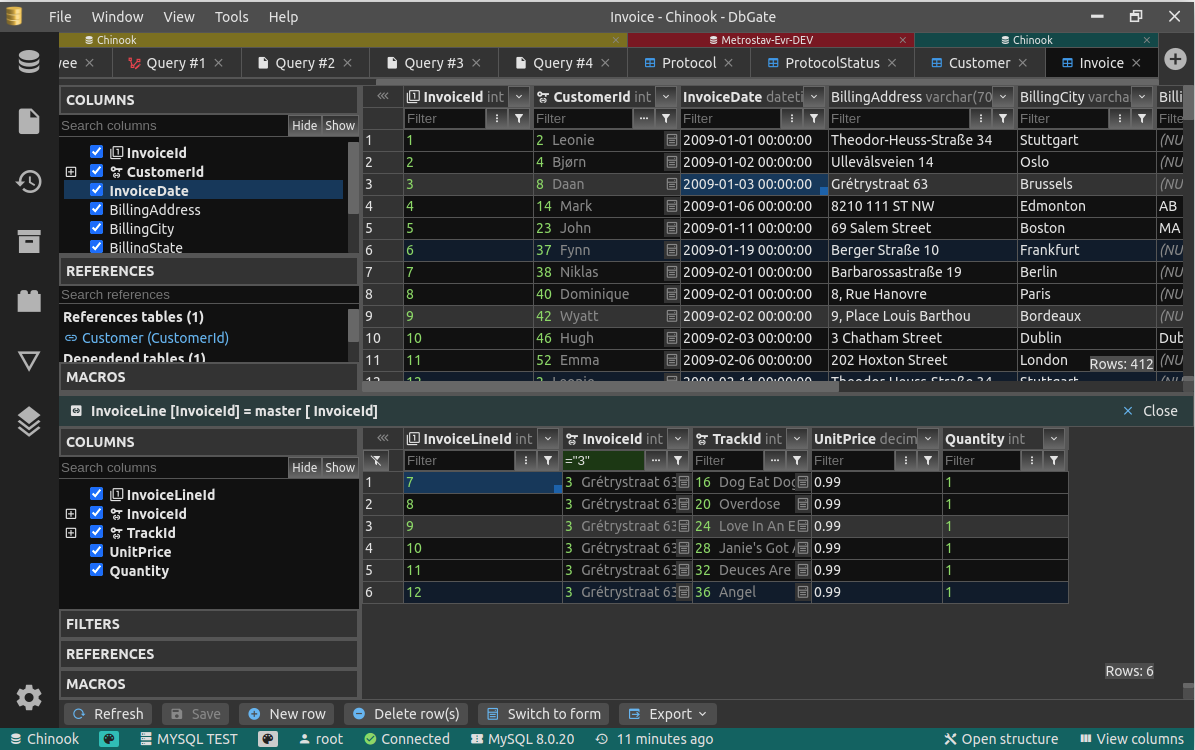 ](https://raw.githubusercontent.com/dbgate/dbgate/master/img/screenshot2.png)[ ](https://raw.githubusercontent.com/dbgate/dbgate/master/img/screenshot4.png)[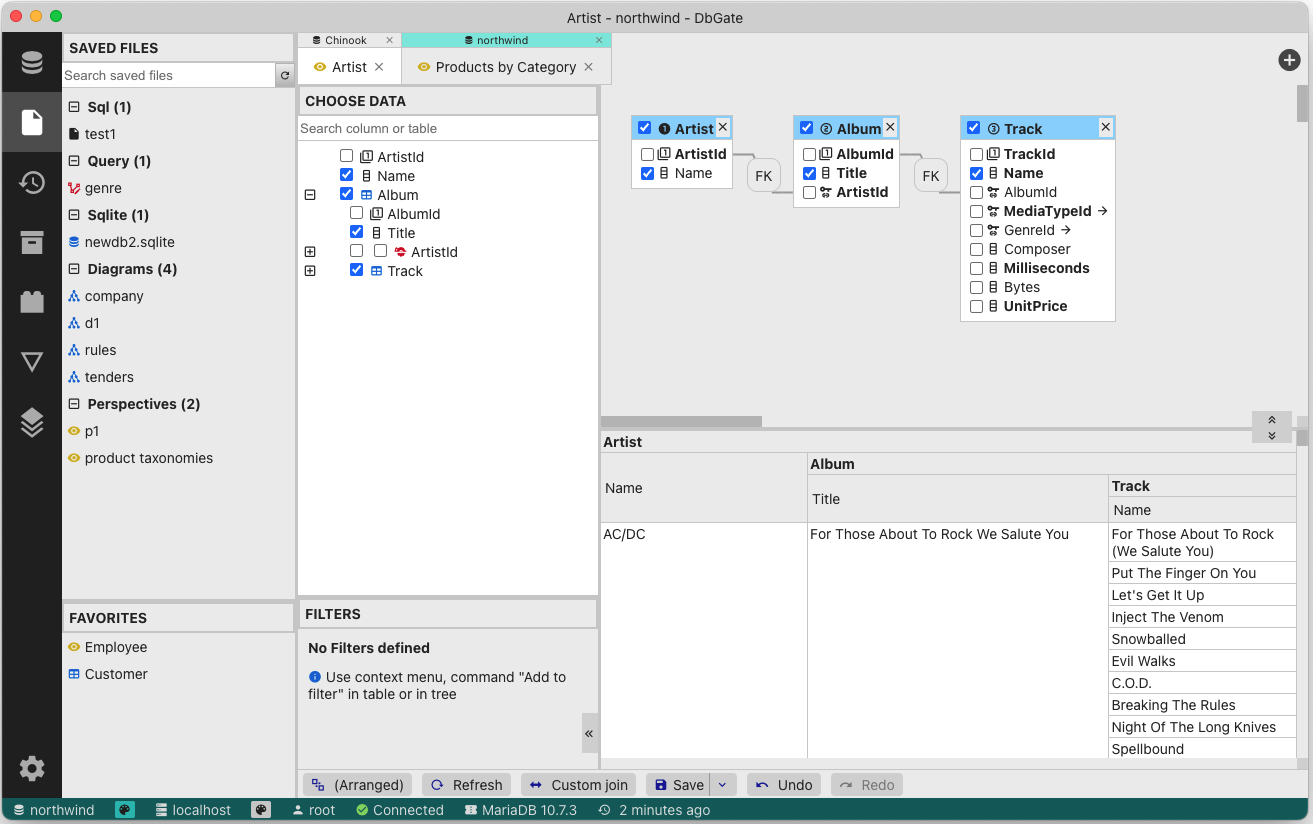](https://raw.githubusercontent.com/dbgate/dbgate/master/img/screenshot3.png)
|
||
|
||
## 功能
|
||
|
||
* 表格数据编辑,预览 SQL 更改脚本
|
||
* 编辑表结构、索引、主键和外键
|
||
* 比较和同步数据库结构
|
||
* ER 图
|
||
* 浅色和深色主题
|
||
* 主/详细视图,外键查找
|
||
* 查询设计器
|
||
* 表格多列的舒适工作表单
|
||
* MongoDB 集合的 JSON 视图
|
||
* 探索表格、视图、过程、函数、MongoDB 集合
|
||
* SQL 编辑器
|
||
* 执行 SQL 脚本
|
||
* SQL 代码格式化工具
|
||
* SQL 代码自动补全
|
||
* 添加 SQL 左/内/右连接实用工具
|
||
* Mongo JavaScript 编辑器,执行 Mongo 脚本(使用 NodeJs 语法)
|
||
* Redis 树形视图,从键生成脚本,运行 Redis 脚本
|
||
* 可在 Windows、Linux 和 Mac 上作为应用程序运行。或在服务器上的 Docker 容器中,以及在客户端的网页浏览器中运行。
|
||
* 从/到 CSV、Excel、JSON、NDJSON、XML 导入/导出
|
||
* 免费表格编辑器 - 快速编辑表格数据(在导入/导出前清理数据,原型表格等)
|
||
* 存档 - 在本地文件系统(或使用 Web 应用时在 DbGate 服务器上)以 NDJSON 文件备份您的数据
|
||
* 图表,将图表导出到 HTML 页面
|
||
* 有关详细信息,如何将 DbGate 运行在 Docker 容器中,请访问 [docker hub](https://hub.docker.com/r/dbgate/dbgate)
|
||
* 可扩展插件架构
|
||
* 视角 - 复杂关系数据的嵌套表格视图,MongoDB 数据库的查询设计器
|
||
|
||
## 如何贡献
|
||
|
||
欢迎任何形式的贡献。如果您想在不编码的情况下做出贡献,请考虑以下方式:
|
||
|
||
* 告诉你的朋友关于 DbGate 或者在社会网络上分享——当更多的人使用 DbGate 时,它将变得更好
|
||
* 在 [Slant.co](https://www.slant.co/improve/options/41086/~dbgate-review) 或 [G2](https://www.g2.com/products/dbgate/reviews) 上写评论
|
||
* 如果你在应用中遇到问题,或者有新功能的想法,请创建问题。如果问题已经存在,你可以在它上面留言,以优先处理最需要的议题
|
||
* 在 [youtube](https://www.youtube.com/playlist?list=PLCo7KjCVXhr0RfUSjM9wJMsp_ShL1q61A) 上创建一些教程视频
|
||
* 成为 GitHub sponsors [赞助者](https://github.com/sponsors/dbgate)或 [Open collective](https://opencollective.com/dbgate) 的资助者
|
||
* 在你能够接受少量编码的情况下,你可以[创建插件](https://dbgate.org/docs/plugin-development.html) 。实际上,为新的主题创建插件无需 JS 编码
|
||
|
||
谢谢!
|
||
|
||
## DbGate 有什么不同?
|
||
|
||
现在有很多数据库管理器,那么为什么选择 DbGate?
|
||
|
||
* 适用于所有平台 - Windows、Linux、Mac、Web 浏览器(+计划中的移动 Web),功能不受任何妥协
|
||
* 基于独立的 NPM 包,可以在没有 DbGate 的情况下运行脚本(例如 - [CSV 导出](https://www.npmjs.com/package/dbgate-plugin-csv) )
|
||
* 许多基于外键的数据浏览功能 - 主/详细,展开列,可展开表单视图
|
||
|
||
## 设计目标
|
||
|
||
* 应用简洁性 - DbGate 汲取了旧版 DbGate、 [DatAdmin](https://www.softpedia.com/get/Internet/Servers/Database-Utils/DatAdmin-Personal.shtml)、 [DbMouse](https://www.softpedia.com/get/Internet/Servers/Database-Utils/DbMouse.shtml) 和 [SQL Database Studio](https://en.wikipedia.org/wiki/SQL_Database_Studio) 中的最佳元素,仅取其精华
|
||
* 最小化依赖
|
||
* 前端 - Svelte
|
||
* 后端 - NodeJs, ExpressJs, 数据库连接驱动
|
||
* JavaScript + TypeScript
|
||
* 应用 - electron
|
||
* 平台无关 - 服务器上作为单个 Docker 容器中的 Web 应用运行,或作为使用 Electron 平台的 Linux、Windows 和 Mac 上的应用程序运行
|
||
|
||
## 如何运行开发环境
|
||
|
||
简单版本 - 运行 WEB 应用:
|
||
|
||
```sh
|
||
yarn
|
||
yarn start
|
||
```
|
||
|
||
如果您想有更多控制权,运行 WEB 应用:
|
||
|
||
```sh
|
||
yarn # install NPM packages
|
||
```
|
||
|
||
然后在3个终端中同时运行以下3个命令:
|
||
|
||
```
|
||
yarn start:api # run API on port 3000
|
||
yarn start:web # run web on port 5001
|
||
yarn lib # watch typescript libraries and plugins modifications
|
||
```
|
||
|
||
在端口 3000 上运行 API,在端口 5001 上运行 Web 应用
|
||
在您的浏览器中打开 [http://localhost:5001](http://localhost:5001)
|
||
|
||
如果您想运行 electron 应用:
|
||
|
||
```sh
|
||
yarn # install NPM packages
|
||
cd app
|
||
yarn # install NPM packages for electron
|
||
```
|
||
|
||
然后在3个终端中同时运行以下3个命令:
|
||
|
||
```
|
||
yarn start:web # run web on port 5001 (only static JS and HTML files)
|
||
yarn lib # watch typescript libraries and plugins modifications
|
||
yarn start:app # run electron app
|
||
```
|
||
|
||
## 如何在本地运行构建的 electron 应用
|
||
|
||
此模式与 electron 应用的生成运行非常相似。Electron 不使用 localhost:5001。
|
||
|
||
```sh
|
||
cd app
|
||
yarn
|
||
```
|
||
|
||
```sh
|
||
yarn
|
||
yarn build:app:local
|
||
yarn start:app:local
|
||
```
|
||
|
||
## 如何创建插件
|
||
|
||
创建插件在[文档](https://github.com/dbgate/dbgate/wiki/Plugin-development)中有描述
|
||
|
||
但是很简单:
|
||
|
||
```sh
|
||
npm install -g yo # install yeoman
|
||
npm install -g generator-dbgate # install dbgate generator
|
||
cd dbgate-plugin-my-new-plugin # this directory is created by wizard, edit, what you need to change
|
||
yarn plugin # this compiles plugin and copies it into existing DbGate installation
|
||
```
|
||
|
||
重启 DbGate 后,您就可以从 DbGate 使用您的新插件。
|
||
|
||
## 日志记录
|
||
|
||
DbGate 使用 [pinomin logger](https://github.com/dbgate/pinomin)。因此,默认情况下,它将 JSON 日志消息输出到控制台和日志文件中。如果您想查看格式化的日志,请使用 [pino-pretty](https://github.com/pinojs/pino-pretty) 日志格式化器。 |